The On-Page Problem Most Stores Have
Last summer, this store's chains collection got 102 page views. Not per day. That was the total across four weeks, from 92 people.
The products weren't the issue. The pages were. Most online stores launch their collection pages exactly the way the theme built them: a heading, a grid of products, and nothing else. No copy. No keyword behind the title. No links between related collections. The store looks fine to a shopper who is already on it. To Google, there is almost nothing to read.
On top of that, this store kept adding filter and sub-collection pages for moissanite, Cuban, plain-janes, and on-sale items. Each one created another URL that looked a lot like the last one, with no rules for which version Google should keep.
This case study walks through what we found, the 34-point checklist we ran on every page, and what the traffic looked like twelve months later.
The core on-page insight: none of these fixes are hard on their own. The hard part is doing all 34 of them on every page and never letting one slip. That is why we work off a checklist instead of instinct.
What the Audit Found
Before changing anything, we audited the whole chains collection: the main hub page, four sub-collections, and every product page under them. Here is what the data showed.
Keyword Problems
- x Titles and meta descriptions skipped the words shoppers actually search for
- x No keyword assigned to any sub-collection, so they all read the same to Google
- x Main keyword missing from the first 100 words on every collection page
- x Brand suffix eating the character budget in the title tag
Structure Problems
- x The chains hub barely linked to its own sub-collections
- x Weak heading structure with almost no text under it
- x Default theme templates shipped nearly blank
- x No table of contents or FAQ on any long page
Index Problems
- x Filter pages like the on-sale view had no canonical control
- x Near-copies of the same page competing for the same shoppers
- x Long URLs that didn't carry the keyword
- x No plan for which pages should be submitted for indexing first
Technical On-Page Problems
- x Missing Open Graph images on collection and product pages
- x No schema markup anywhere on the store
- x Heavy, uncompressed product images slowing pages down
- x Thin or missing image alt text across the catalogue

Our On-Page Approach
Ecommerce on-page SEO is different from blog SEO. There are far more pages, most of them are built from the same template, and the copy has to help someone choose a product without getting in the way of the photos. Getting the same things right on every page matters more than being clever on any one page.
Our approach runs in three phases, in this order:
Audit before touching anything
Always firstGA4, Google Search Console, and Ahrefs across every page in the collection. We map what is ranking, what is thin, which filter URLs are duplicating each other, and where the internal links are missing. No page gets edited until we can see the whole picture.
Give every page one job
Structure firstOne keyword per page, and no two pages chasing the same one. The hub owns the broad term. Moissanite, Cuban, and plain-jane chains each own their own. We settle canonical tags and internal links at this stage, before writing a word of copy, because rewriting content on a broken structure just moves the problem.
Optimize with a checklist, not instinct
SystematicEvery page runs through the same 34 points: title, meta, H1, heading order, keyword placement, internal links, image alt text, speed, schema, OG image, canonical, and indexing. Nothing is left to judgment. Each point is checked and marked off before the page goes live.
The 34-Point On-Page Checklist
This is the full list. Nothing on it is a secret. It just has to get done on every page, every time.
| Action | What It Means | Tool |
|---|---|---|
| SEO Title | A title that gets clicks. Keep it between 40 and 60 characters. | metatags.io |
| Keyword in Title | Use the main keyword in the page title. | N/A |
| Add Featured Image | Set a featured image in the right-bar settings. | N/A |
| Image ALT Tag | Write alt text using the main and secondary keywords. | N/A |
| Image Optimization | Use images where they help. Compress them so the page loads fast. Keep a clean URL structure. | tinypng.com |
| SEO Meta Description | A description that gets clicks. Keep it between 140 and 155 characters. | N/A |
| Keyword Density | Use the exact keyword no more than 3 times per 1,000 words. | Natural keyword variations |
| Keyword in Introduction | Use the main keyword once in the first 100 words. | N/A |
| Keyword in H1 | Use only one H1 tag, and put the main keyword in it. | N/A |
| Keyword in H2, H3 | Use H2 to H6 tags in the content. Add related and secondary keywords. | N/A |
| Main Keyword in Footer | Use the main keyword once at the end of the page. | N/A |
| LSI and Secondary Keywords | Use a good number of related and secondary keywords where they fit. | N/A |
| Post URL | Put the main keyword in the URL and keep it short. | No numbers in URLs |
| Internal Backlink | Add do-follow internal links where they help the reader. Do not overuse exact-match anchor text. If there is a main category or pillar page, link to it. | Ahrefs |
| External Backlink | Add outside links where they help. Use nofollow and open in a new tab. For trusted sites like Wikipedia or Healthline, do-follow is fine. | Ahrefs |
| Short Paragraphs | Break the text into short paragraphs. Easier to read, and it lowers bounce rate. | N/A |
| Video Content | Add a helpful video to the page when you can. | N/A |
| Duplicacy / AI Test | Make sure the text is unique and not written by AI. Check it with 2 or 3 copy tools. | copyscape.com |
| Set Canonical URL | Shopify and WordPress add canonical tags for you. Still check the tag before or right after you publish. | N/A |
| Redirection | Always add a redirect if you change a page URL. | N/A |
| Mobile-Friendly Check | Make sure the page works well on phones. | Mobile-Friendly Test |
| Speed Check | Make sure the page loads fast. | PageSpeed Insights |
| Add FAQ | Add a helpful FAQ. Optional, but it earns space in search results. | Schema Generator |
| Responsive | Make sure the page fits every screen size. | Mobile-Friendly Test |
| Insert Product Link | If the page fits a product, embed your own product. On other sites, use an affiliate link. | N/A |
| Call to Action | Add a clear call to action. | N/A |
| Schema Markup | Add schema to the page wherever you can. | Rich Results Test |
| Table of Contents | Add a table of contents on long pages. It makes the page easier to use. | N/A |
| Feature Snippets | Write content that can win featured snippets. | N/A |
| Submit for Index | Ask Google to index new pages. Only 2 or 3 pages per project each day. | GSC |
| Post Layout | The page uses the default template. Change it only if it is set to full-width or another builder. | N/A |
| Date and Time | When you update a page, change the published date and time too. | N/A |
| First-Fold Optimization | Keep the top of the page clean. Show only the most useful information. | N/A |
| Open Graph Image Check | Every page needs an OG image. This is a must on collection and product pages. | N/A |
Our on-page SEO service applies the same 34-point process to every collection and product page you own.
What We Changed on the Chains Collection
The checklist covers 34 points, but five of them did most of the heavy lifting on this store.
| Area | What We Did | Why |
|---|---|---|
| Titles and meta | Rewrote the title, meta description, and H1 on the hub and every sub-collection, keyword first, under 60 characters | The listing has to earn the click before the page can do anything at all |
| Keyword assignment | Gave moissanite, Cuban, and plain-jane chains their own keyword instead of all chasing the same one | Two pages fighting over one keyword means neither of them wins it |
| Collection copy | Added real copy to pages that shipped nearly blank, in short paragraphs, keyword in the first 100 words | A grid of product photos gives Google nothing to read and nothing to rank |
| Internal links | Linked the chains hub down to every style, and linked the styles back to the hub | Shoppers use them to compare styles, and Google uses them to see which page matters most |
| Technical basics | Mobile view, load speed, compressed images, alt text, schema, and OG images on every page | A few minutes per page, and most stores skip all of it |
The rule we work to: one page, one keyword, one job. If two pages in the same collection are aiming at the same search, one of them is holding the other one back. Deciding who owns which keyword is the most important call in the whole project.
Chains, moissanite, and hundreds of near-identical products need collection pages that separate cleanly. Our jewelry SEO service does exactly that work.
Fixing the Filter Pages
This is the problem almost every online store has and almost nobody notices. Filters are useful for shoppers. Left alone, they also generate an endless supply of URLs that look like copies of each other.
On this store, the on-sale filter and the sub-collections were all producing pages with the same products, the same layout, and the same thin copy. Google had no way to tell which one deserved to rank. The fix was short and mechanical.
Before
Main chains page
87 views from 87 people
1.00 pages per visit
Filter and sub-collection pages
No canonical control, long URLs
Result: every visitor saw one page and left
After
Main chains page
81,233 views from 21,621 people
3.76 pages per visit
Filter and sub-collection pages
Canonical tags set, short keyword URLs, redirects in place
Result: one clear page per search, and shoppers browse on
Short URLs with the keyword in them, a canonical check on every filter view, and redirects wherever a URL changed. We also kept indexing requests to two or three pages a day rather than pushing everything at once. Google stopped spreading its attention across near-copies and settled on the pages we wanted ranked.
Results: 102 Views to 100,089
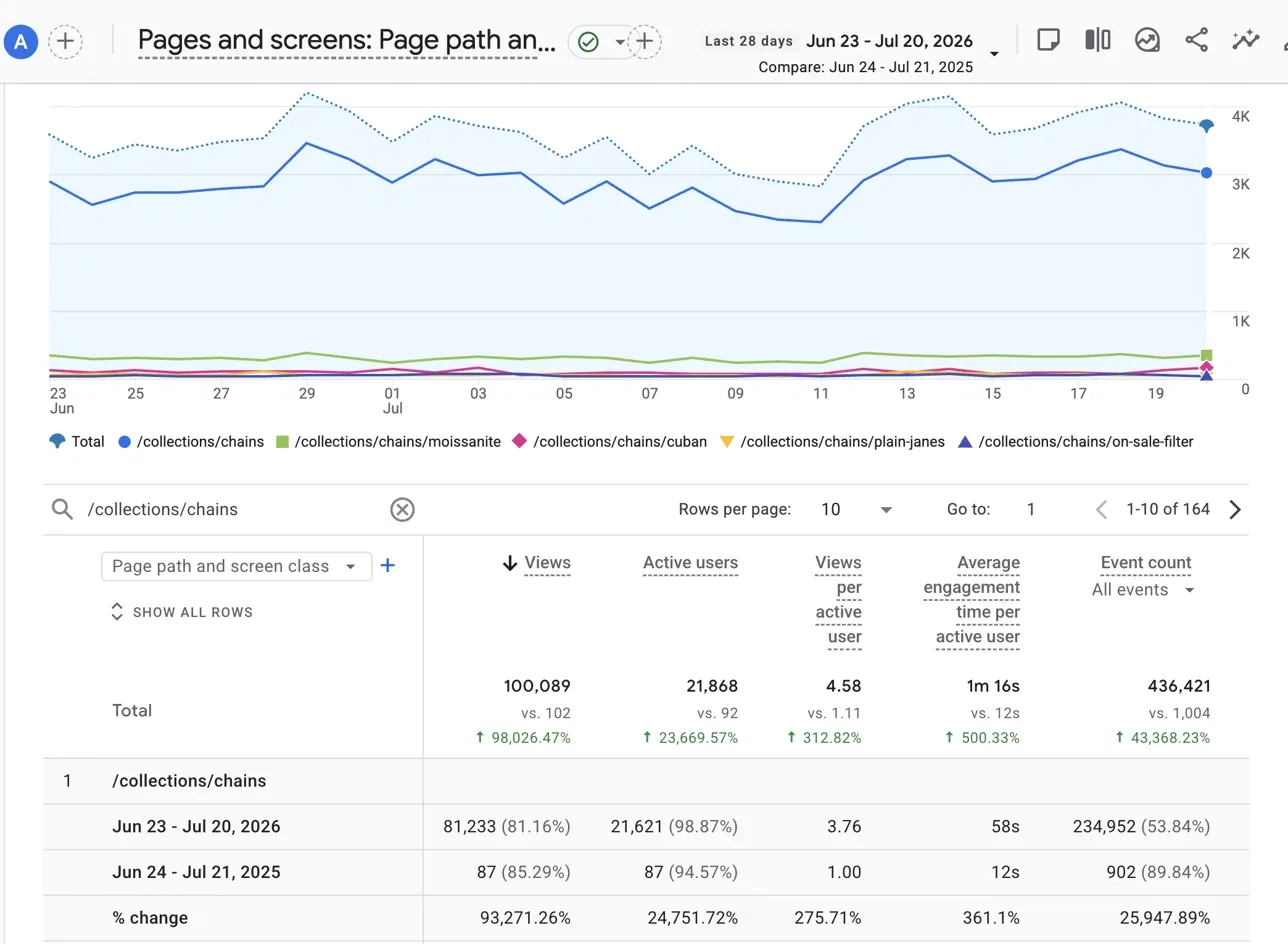
One note before the numbers. This compares the same 28-day window in 2026 against 2025. The store was new and unoptimized in 2025, so the percentages look wild. Read them as going from almost no traffic to real traffic, not as normal year to year growth.
Across all 164 chain URLs:
| Metric | Before (2025) | After (2026) | Change |
|---|---|---|---|
| Page views | 102 | 100,089 | up 98,026% |
| Active users | 92 | 21,868 | up 23,670% |
| Views per active user | 1.11 | 4.58 | up 313% |
| Average time on page | 12s | 1m 16s | up 500% |
| Event count | 1,004 | 436,421 | up 43,368% |
GA4, Jun 23 to Jul 20 2026 compared against Jun 24 to Jul 21 2025. Same 28-day window both years.
And the main collection page on its own:
| Metric | Before (2025) | After (2026) | Change |
|---|---|---|---|
| Page views | 87 | 81,233 | up 93,271% |
| Active users | 87 | 21,621 | up 24,752% |
| Views per active user | 1.00 | 3.76 | up 276% |
| Average time on page | 12s | 58s | up 361% |
| Event count | 902 | 234,952 | up 25,948% |
The number we care about most is not page views. It is 4.58 pages per visit. People landed on the chains collection and kept clicking through to other styles instead of leaving. A year earlier that figure was 1.11, which means almost everybody saw one page and bounced.
Filter and sub-collection URLs here were near-copies with no canonical control. Fixing that took the main collection page from 87 views to 81,233. Our technical SEO service handles that layer for you.
Explore Our Technical SEO ServiceWhy It Worked
Three things drove most of the movement, and they apply to any online store.
Every page finally had something to read
Biggest leverCollection pages ship as a heading and a product grid. That is fine for a shopper who is already browsing, and useless to a search engine deciding what the page is about. Writing real copy, putting the keyword in the first 100 words, and fixing the heading order gave each page an actual subject. Time on page went from 12 seconds to 1 minute 16 seconds, which is the clearest sign shoppers found what they came for.
Internal links turned separate pages into one collection
ArchitectureBefore, the hub barely linked to its own sub-collections. After, someone looking at Cuban chains could reach the moissanite ones in two clicks. That single change is what moved views per visit from 1.11 to 4.58. Google reads those links the same way a shopper does, as a map of which page is the main one.
One keyword per page stopped the pages competing
StructureMoissanite, Cuban, plain-jane, and on-sale pages were all built from the same template and all pointing at the same search. Giving each one its own keyword and its own canonical tag meant Google had a single obvious answer for each query instead of four near-copies to choose between.
Key Takeaways for Ecommerce On-Page SEO
Most stores do not have a product problem. They have an empty page problem.
Default collection templates ship with a heading and a grid. Until you add copy, a keyword, and a proper heading structure, there is nothing on the page for Google to rank.
One page, one keyword, one job.
If two collection pages are aiming at the same search, they are holding each other back. Split them by style, by material, or by intent, and give each one its own keyword.
Filters will quietly wreck a collection if you let them.
Every filter view can become another indexed near-copy. Canonical tags, short keyword URLs, and redirects keep Google looking at the pages you actually want ranked.
Internal links are the cheapest win available to you.
Linking a hub to its sub-collections and back again costs nothing and takes an afternoon. On this store it was the change that moved pages per visit from 1.11 to 4.58.
A checklist beats instinct once you pass a handful of pages.
Across 164 URLs, nothing went live missing a title, an H1, a canonical, or an OG image. That consistency mattered more than any single clever tactic, and it is what keeps quality steady as the store keeps adding products.
Running a Store That Should Be Ranking Higher?
We will audit your collection pages, sort out the filter URLs, and run every page through the same 34-point checklist we used here.
Get an On-Page SEO Audit