Webflow and SEO: The Honest Picture
Webflow is a powerful visual website builder with a growing share of B2B and SaaS sites. It handles a lot of technical SEO basics well out of the box: clean HTML output, fast rendering, SSL, automatic sitemaps, and decent meta tag controls in the CMS. For many sites, this is enough to get started.
But Webflow has real limitations when you need to go beyond the basics. Schema markup requires manual injection. Heading hierarchies are set by designers who prioritize visual style over semantic structure. The CMS has no native schema support. And certain platform-generated elements, like nav labels and footer links rendered as heading tags, can pollute the page structure in ways that quietly hurt rankings.
PackMaxQ's site had all of these issues. The site was well-designed, fast, and secure, but from an SEO architecture standpoint, it was largely invisible. Title tags were default or duplicated. No schema existed anywhere on the site. Heading hierarchy was inconsistent across all 16 priority pages. Internal links were sparse and unplanned.
The challenge: deliver full on-page SEO and schema markup across 16 pages on a live Webflow site, without rebuilding the platform, without a developer on standby, and without disrupting a site that was already getting real traffic.
The Webflow SEO Limitations We Had to Work Around
We audited the full site before touching anything. Here's what we found, and what each issue actually meant for search performance:
No native schema markup support
Webflow has no built-in structured data tool. You can't add Product, FAQPage, or Organization schema through the Webflow UI. Without schema, Google's AI Overview has no structured signal to pull from, and rich results like FAQ dropdowns in SERPs are completely off the table.
Heading hierarchy set by visual design, not semantic structure
In Webflow's designer, any text element can be styled as any heading size visually while being assigned a different tag in the DOM. We found multiple pages with two or more H1 tags, nav elements using H2/H3, and footer labels using heading tags, all of which confuse Google's understanding of what the page is actually about.
Page-level custom code injection required for advanced SEO
Adding canonical tags, hreflang, or per-page custom schema in Webflow requires going into each page's custom code settings and injecting it in the <head> or before </body>. There's no bulk apply. For 16 pages this is manageable, but for 160 it would require a different approach entirely.
OG tag fields exist but were unpopulated
Webflow provides og:title, og:description, and og:image fields per page, but they default to empty or pull from the meta title. On PackMaxQ, og:url and og:image were missing across all 16 pages, which breaks social sharing previews and is a weak signal for Google's understanding of canonical page identity.
Our Webflow SEO service works around them with schema, clean headings, and proper canonicals.
The Webflow SEO Workarounds: What Actually Works
Every limitation above has a clean solution within Webflow's existing toolset. None of them required a platform migration, a developer, or rebuilding the site.
Schema via per-page custom code injection
For each of the 16 pages, we wrote the appropriate JSON-LD schema block and injected it into Webflow's page-level <head> custom code field. Organization schema went on the homepage. Product and FAQPage schema went on each product page. Service schema on the service pages. BreadcrumbList on all 16. Webflow renders this cleanly in the published HTML, Google crawls and validates it exactly as if it were hardcoded.
Schema types deployed: Organization · WebPage · Product · ProductGroup · Service · FAQPage · BreadcrumbList · Review
Heading hierarchy corrected in the Webflow Designer
In the Webflow Designer, every text element has a tag assignment separate from its visual styling. We went into each page and reassigned element tags (demoting footer labels from H3 to DIV/P, removing duplicate H1s, restructuring H2/H3 sections to follow logical information hierarchy) without changing how the page looks visually. This is the most common Webflow SEO fix that gets missed.
Self-referencing canonicals in Webflow's SEO settings
Webflow has a per-page canonical URL field under Page Settings → SEO. We populated this with the exact canonical URL for all 16 pages. Webflow renders this as a standard <link rel="canonical"> tag in the <head>. No plugin, no custom code, just a field that was left empty.
OG tags populated via Page Settings
Webflow's Open Graph fields sit inside the same Page Settings panel as the SEO fields. We populated og:title, og:description, og:image, and og:url for all 16 pages. For og:image we selected a product image already uploaded to the Webflow asset library, no external hosting needed.
The Execution: 16 Pages, No Platform Rebuild
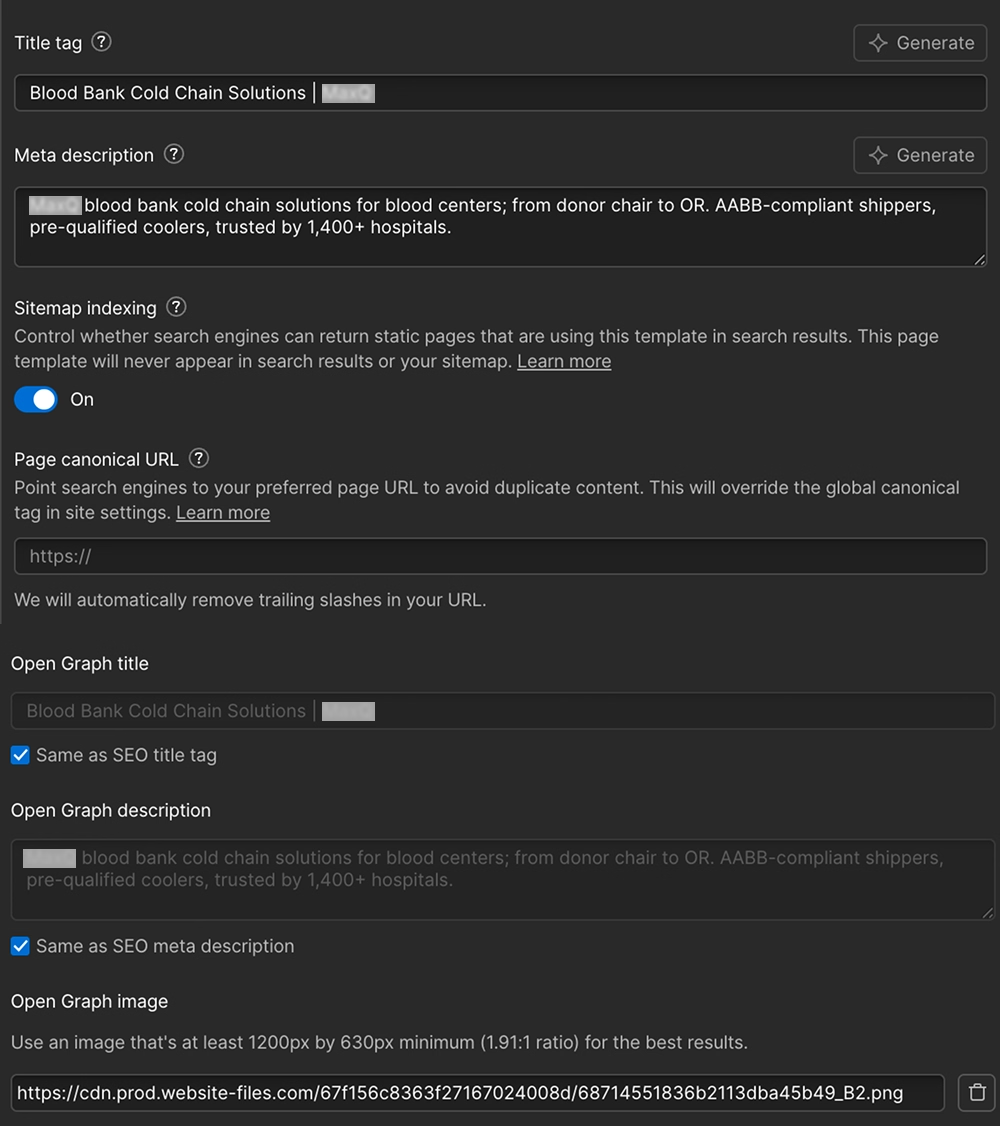
Every page followed the same structured process. Before we touched any page in Webflow, each page had a full audit document specifying the exact before/after for every element, so the changes were pre-reviewed by the client before anything went live.
Webflow-specific note: changes in the Webflow Designer are staged before publishing. Every heading fix, schema injection, and meta update was reviewed in staging before going live. This is a significant advantage over WordPress, there's no risk of a plugin conflict or a live edit going wrong.
The Results
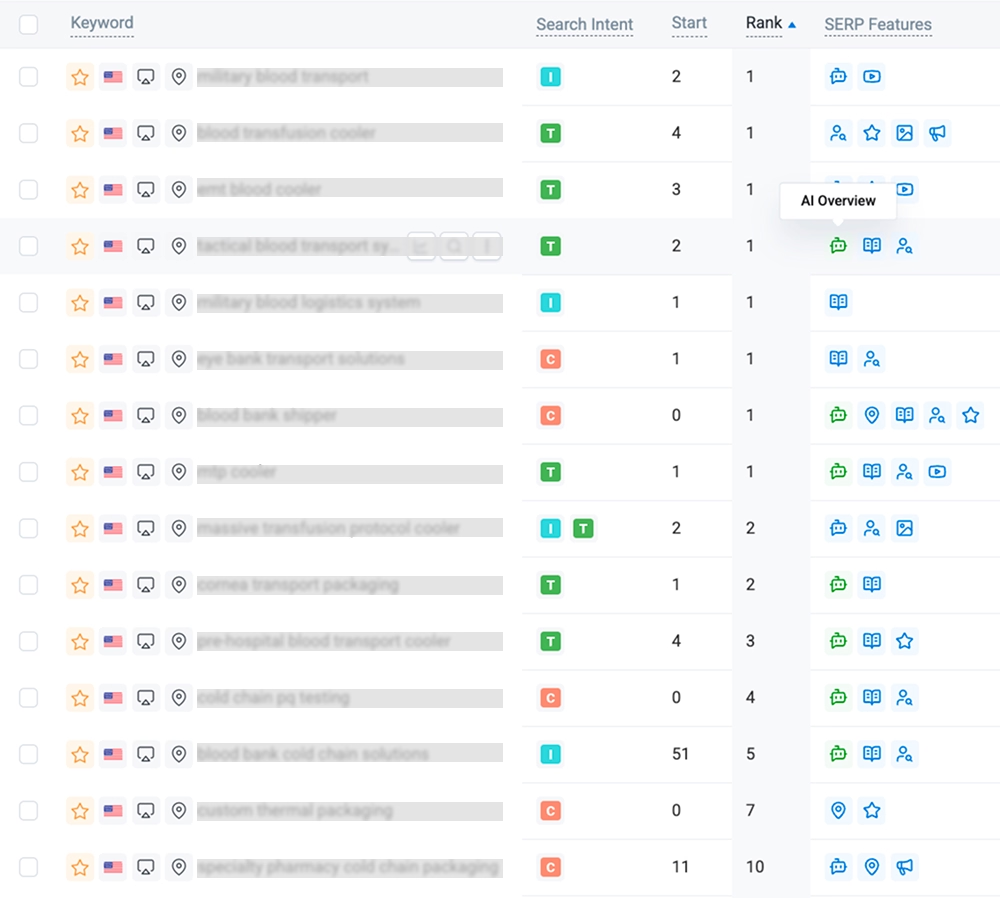
All changes were deployed within the Webflow platform with no external tooling, no developer, and no platform migration. The results across 20 tracked keywords:
The 9 Google AI Overview placements are the result of a single Webflow-specific decision: injecting FAQPage and Product schema via custom code on each page. Before schema was deployed, none of these pages appeared in AI Overview. After, nine of them did. Webflow doesn't make this easy, but it makes it possible, and the payoff is measurable.
Eight schema types, single H1s, and self-referencing canonicals produced 7 #1 rankings and 9 AI Overview placements here. Our technical SEO service audits and deploys all of it, on any platform.
Explore Our Technical SEO ServiceWhy It Worked on Webflow Specifically
Webflow's constraints are real, but they're workable, and working within them has advantages.
Webflow's HTML output is clean
The platform advantageUnlike WordPress with a poorly-configured theme, Webflow outputs clean, valid HTML by default. There are no plugin conflicts, no bloated <head> sections, no JavaScript rendering delays for critical on-page content. Once we fixed the heading hierarchy and injected the schema, the signals Google received were clean and unambiguous. That's harder to achieve on a WordPress install with 12 active plugins.
Per-page custom code gives full schema control
The workaround that winsWebflow's per-page custom code field is actually more flexible than most WordPress schema plugins, because it accepts raw JSON-LD with no abstraction layer. We could write exactly the schema we needed for each page type without fighting a plugin's UI. The Product schema for a blood bank shipper and the Service schema for a cold chain consulting page were both deployed cleanly and validated without errors in Google's Rich Results Test.
Staging-first publishing prevents live errors
The process advantageEvery Webflow change is staged before it hits the live site. For a B2B site where the client needs to approve content changes, including product descriptions and FAQ answers that touch on regulated product claims, this staging workflow is genuinely useful. We delivered full audit documents for each page, the client reviewed and commented, we applied the approved changes in staging, then published. Nothing went live without sign-off.
Key Takeaways for Webflow SEO
Don't migrate off Webflow just to get schema.
The custom code injection field gives you full JSON-LD control per page. It's manual, but for a site of under 50 pages it's entirely manageable and the output is clean.
Fix heading hierarchy in the Designer, not with CSS.
Making an H3 look like an H2 visually via CSS does nothing for SEO. The tag assignment in Webflow's Designer is what Google reads. Change the tag, the visual style stays the same.
Webflow's Page Settings panel covers most SEO basics natively.
Title tag, meta description, canonical URL, OG tags: all in one place, per page. The issue is they're almost always left empty. Populate them for every page before anything else.
Webflow's clean HTML is a genuine SEO advantage.
Compared to a bloated WordPress install, Webflow's rendered HTML is lean and valid. Once you fix the structural issues, Google gets a clean signal with no plugin noise. That's worth something.
The scale limit is real, plan ahead.
Manual per-page schema injection works up to 50–80 pages. Beyond that, you need Webflow CMS with custom fields and a generated schema approach. Build that architecture early if your site will grow.
Got a Webflow Site That's Not Ranking?
We'll audit your Webflow SEO setup (heading structure, schema gaps, meta tags, canonicals) and fix everything without touching your design.
Get Your Webflow SEO Audit