The Audit Scope
Chasin Surf is a family travel blog with approximately 370 indexable pages: blog posts, category pages, product pages (paid digital guides), and utility pages. The site has been active for several years, built post by post, with multiple contributors, design iterations, and plugin changes over time.
This type of site accumulates technical debt invisibly. Each post seems fine in isolation. But at the site level, patterns emerge: redirect chains from old URLs, orphan pages from deleted categories, meta descriptions copied across multiple pages, and a heading structure that's been quietly broken by a theme change.
The audit was commissioned as a standalone deliverable: identify everything that's technically holding the site back, prioritize by ranking impact, and produce a URL-level fix list the developer can work from directly.
Methodology & Tools
A technical SEO audit at this scale requires multiple tools cross-referenced against each other. No single tool catches everything.
| Tool | Used For |
|---|---|
| Screaming Frog | Full site crawl: 4xx errors, 3xx redirects, meta data, heading structure, canonical tags, image alt text, internal link analysis |
| Google Search Console | Index coverage report, crawl errors, manual actions, Core Web Vitals, sitemap issues |
| Ahrefs | Orphan page detection, internal link gaps, redirect chain analysis, external link health |
| PageSpeed Insights / GTmetrix | LCP, TTFB, CLS scores per page; image weight analysis; server response time |
| SecurityHeaders.com | HTTP security header audit: HSTS, CSP, X-Frame-Options, Referrer-Policy |
| Google Rich Results Test | Schema markup validation: checking for errors and warnings per page type |
Every issue was verified manually before being included in the report. Screaming Frog flags were cross-referenced against GSC and Ahrefs to filter false positives. Each issue in the final report has a confirmed affected URL count.
Category 1: Crawl Health & Indexation (7 Issues)
A broken link on the Privacy Policy and Contact Us pages pointing to /cdn-cgi/l/email-protection (Cloudflare's email obfuscation endpoint). Fix: remove or replace with correct contact link.
Internal links resolving through a redirect hop before reaching the final page. Each hop wastes crawl budget. Fix: update all internal links to point directly to the final URL.
Some URLs pass through multiple redirects before landing on the final page, losing link equity at each hop. Fix: update to point directly to final destination.
Contradictory signals: page says "don't index me" but the sitemap says "index this." Wastes crawl budget. Fix: remove noindexed URLs from sitemap.
Pages that exist but no other page on the site links to them. Google deprioritizes orphan pages. Fixes vary per URL: add internal links, 301 redirect duplicates, or noindex admin/test pages.
The GA/GTM tracking script in the header is returning a 404. Fix: verify the tag ID (G-PG96KPQS3K) is correct in GTM and no duplicate/broken tags exist.
Paginated archive pages with little standalone SEO value. Fix: add noindex,follow to keep them crawlable but out of the index.
Our WordPress SEO service documents every crawl, speed, and security issue with URL-level fixes.
Category 2: On-Page Technical (13 Issues)
Only 20 unique images, but they appear across 166+ pages. Fix at the WordPress Media Library level, updates propagate automatically to every page using the image.
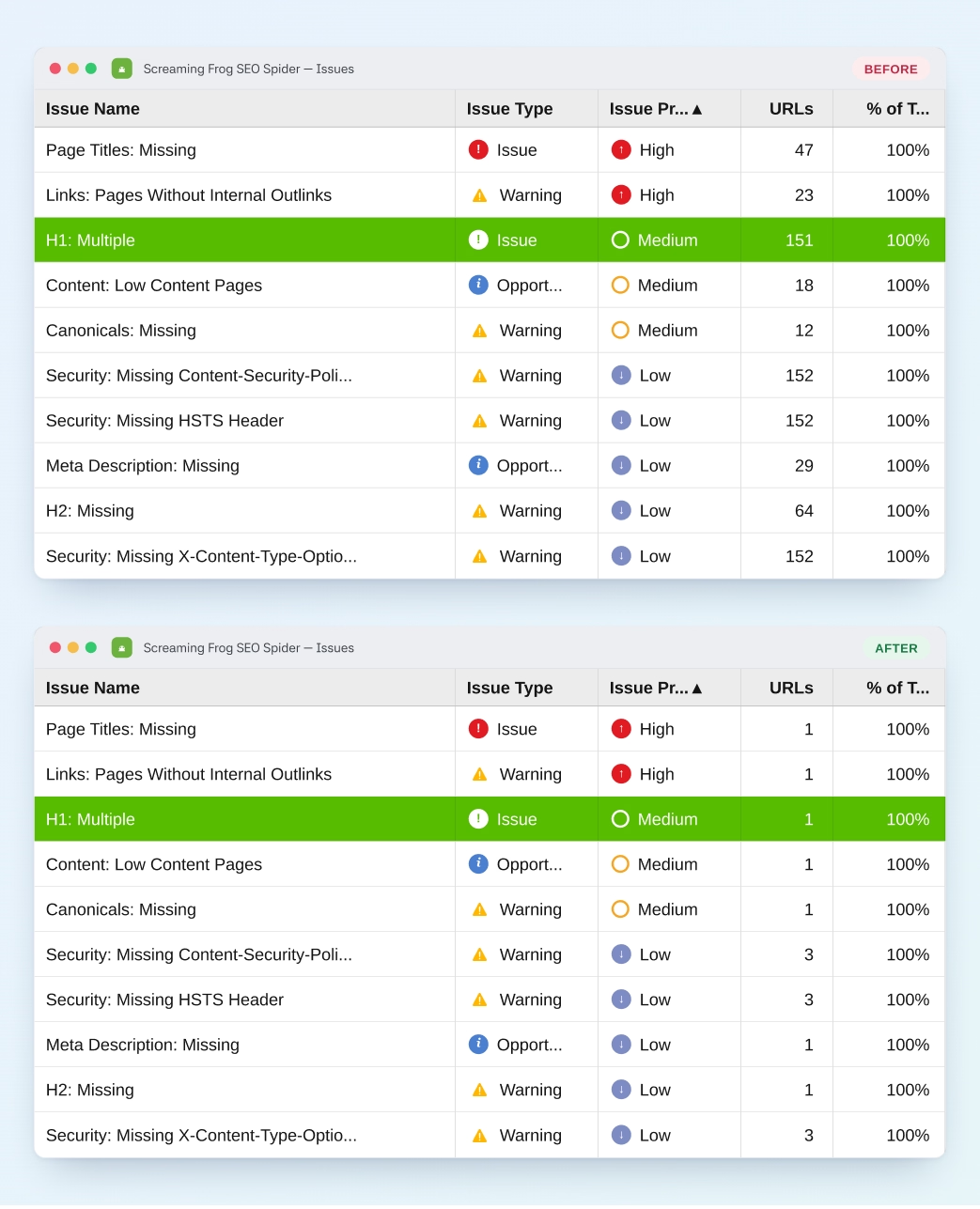
Elementor banner template adding a second H1 sitewide. Fix: change banner heading widget from H1 to div in the global template. One edit, 151 pages fixed.
Titles truncating in Google search results. Brand suffix "- Family Travel Blog" eating most of the budget. All 61 rewrites provided in the spreadsheet, ready to copy into Rank Math.
Google auto-generating poor snippets. 16 hand-written 140–155 char meta descriptions provided in the spreadsheet. 2 pagination URLs should be noindexed instead.
Long descriptions truncating mid-sentence. 6 URLs sharing the same 187-char description. All 63 rewrites provided in the spreadsheet.
Category pages with 1–2 word titles wasting SERP real estate. All 13 rewrites provided padded to 50–60 chars.
Two pairs of duplicate titles. One pair: update title of the category page. Other pair: 301 redirect to canonical version.
Wastes SERP real estate. Two are utility pages that may already be noindexed, verify before fixing.
Missing og:image kills share CTR on Facebook, LinkedIn and messengers. Fix: add OG image per page + set a sitewide fallback in Rank Math.
One real content page needs expansion to 600–1,200 words. One is a category page, leave as-is.
Missed keyword differentiation opportunity. Per-URL title rewrites provided in the spreadsheet.
Add "Contact Us" as H1 near top of page.
Table of Contents H3 appearing before any H2, breaks heading hierarchy. Change TOC label to div or H2.
Category 3: Site Structure & Internal Linking (4 Issues)
"Click here," "read more," "learn more," "here", all waste a strong internal ranking signal. Rewrite anchors to include the destination page's main topic (e.g., "read our Key West family itinerary").
Internal links with no anchor text, mostly linked images or decorative banners. Add descriptive alt text to linked images or remove redundant background links.
Nofollow on internal links blocks PageRank flow unnecessarily. Remove the attribute unless the link is to a login or cart page.
Category 4: Page Speed & Core Web Vitals (2 Issues)
The #1 LCP killer on the site. Fix: convert to WebP, set max upload width at 1920px, add lazy loading for below-the-fold images, cap new uploads at 1000×600px standard. Avoid bulk plugins on a large library, they generate multiple image versions that bloat hosting storage.
Extremely high server response time on 142 pages. Fix: enable full-page caching (WP Rocket or W3 Total Cache), identify heavy plugins, investigate hosting-level performance. Test with GTmetrix to pinpoint bottleneck.
2,148 oversized images and 142 pages with high TTFB were the two critical findings here. Our technical SEO service traces speed problems back to their source.
Category 5: Security & Trust Signals (2 Issues)
HSTS, X-Content-Type-Options, Content-Security-Policy, Referrer-Policy, X-Frame-Options all missing. Fix: configure via Cloudflare. Start CSP in Report-Only mode. Enable HSTS only after confirming all URLs are fully HTTPS.
Each http:// internal link triggers an unnecessary 301
hop. Fix: bulk find-and-replace via Better Search Replace
plugin or WP-CLI:
wp search-replace 'http://chasinsurf.com'
                        'https://chasinsurf.com' --skip-columns=guid
. Verify WP Settings → General both URLs use https.
Crawl waste, duplicate meta, and image weight all get worse once product pages, variations, and filters are in the mix. Our WooCommerce SEO service audits that layer too, at this same depth.
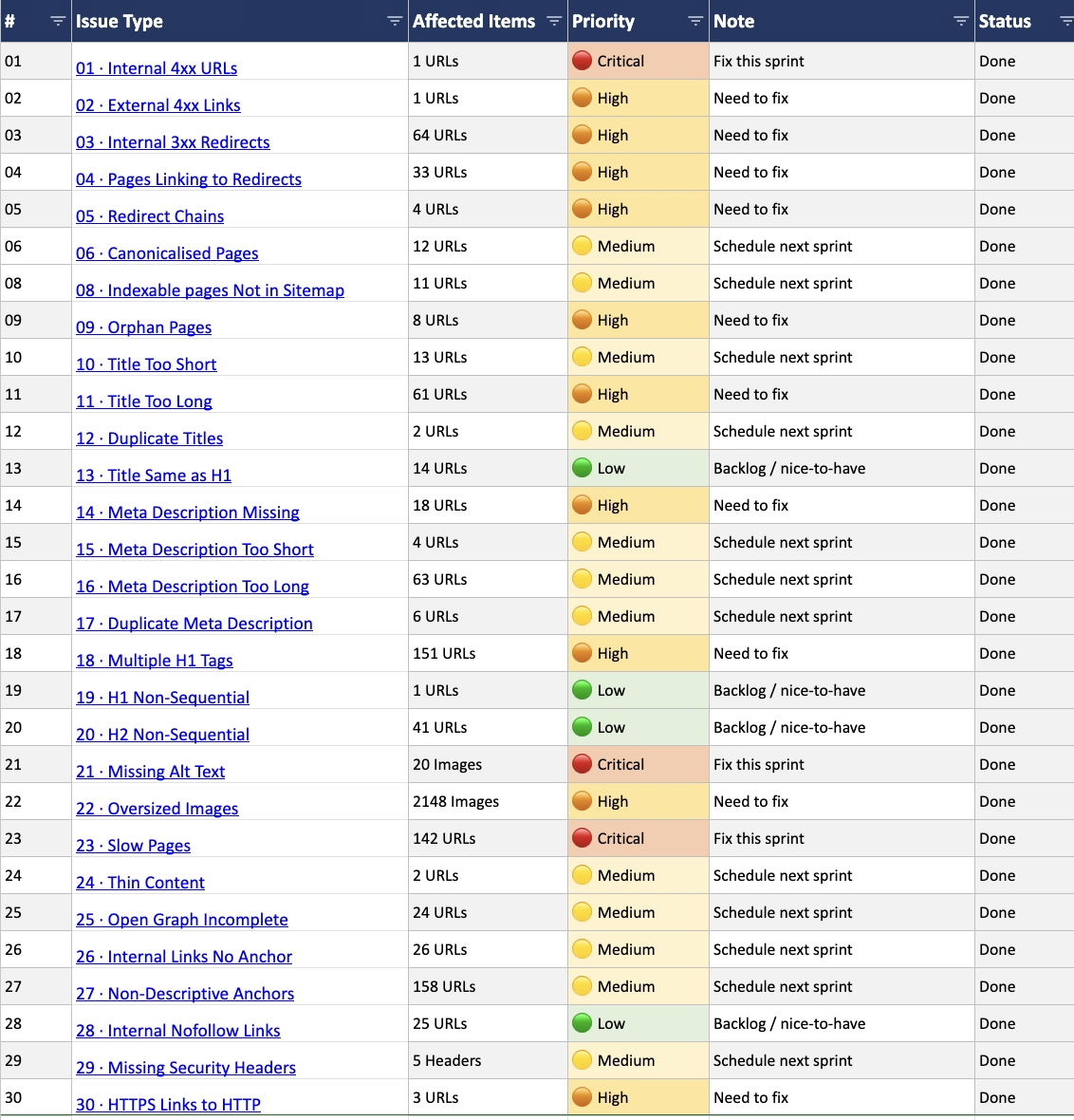
Explore Our WooCommerce SEO ServiceAll 30 Issues at a Glance
The Deliverable Format
A technical SEO audit is only useful if it can be actioned. The deliverable for this project was:
Written audit report
Every issue explained in plain language: what it is, why it matters for rankings, and what the exact fix is. Non-technical clients can read it; developers can act on it.
URL-level spreadsheet (30 tabs)
Every affected URL listed per issue. Each tab has: the URL, the specific problem, the fix action, a suggested rewrite where applicable, and a Status column for tracking. Developers mark rows "Done" as they go.
Loom walkthrough video
A screen-recorded walkthrough explaining the biggest findings and the prioritization rationale. Clients understand what to fix first and why, without needing to read the full report.
Key Takeaways
WordPress sites accumulate technical debt invisibly.
Each post looks fine in isolation. At the site level, patterns emerge that individual post-level work never surfaces. A full crawl is the only way to see the actual state of the site.
Priority grouping is what makes an audit actionable.
30 issues without prioritization is just a to-do list. Grouping by Critical / High / Medium / Low gives the development team a clear start point and ensures the highest-ranking-impact fixes happen first.
The spreadsheet is the working document, not a summary.
Providing suggested rewrites for all 61 title tags and 63 meta descriptions in the spreadsheet means the developer can implement without interpretation. The difference between an audit that gets implemented and one that sits in a folder is this level of specificity.
Image weight is the fastest win for page speed on content sites.
2,148 images over 100KB is not unusual on a blog that's been running for several years. Setting a max upload standard going forward and deleting low-value images costs nothing and immediately improves LCP on every page.
Need a Full WordPress Technical SEO Audit?
We deliver a complete audit with priority-grouped issues, URL-level fix lists, suggested rewrites for titles and meta, and a Loom walkthrough, ready for your developer to implement.
Get a Technical SEO Audit